CNAME to a Translated Page: The Setup Takes 60 Seconds (and What Happens After)
One CNAME record activates DNS-based website localization on a live hostname — no code changes, no SDK, no build pipeline. The setup takes 60 seconds; each page translates on first visit.
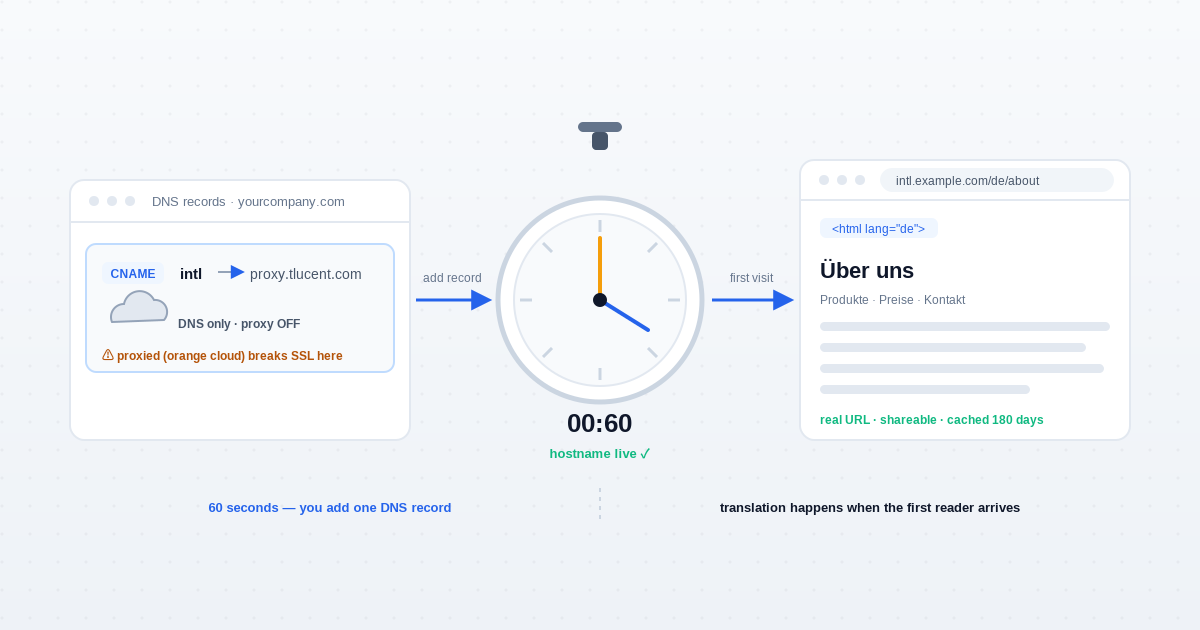
Add one CNAME record to your DNS — intl.yourcompany.com pointing at proxy.tlucent.com — and within about 60 seconds of DNS propagation, your localized hostname serves pages at real URLs like /de/about and /ja/products with correct <html lang> tags. The 60 seconds cover DNS setup and propagation. Translation happens when a visitor first requests a page: seconds per page on cold start, milliseconds thereafter from a 180-day edge cache.
This isn’t instant site-wide translation. It’s DNS-based website localization that activates in 60 seconds and translates on demand — with no code changes, no SDK, and no build pipeline modifications.
What You Actually Get in 60 Seconds
The “60 seconds” claim is precise and limited:
| Timeframe | What happens | What doesn’t |
|---|---|---|
| 0–60 seconds | You add a CNAME record (intl → proxy.tlucent.com). DNS propagates. The hostname starts resolving through the localization edge. | Translation. No content changes until a visitor requests a page. |
| After 60 seconds | The first visitor to intl.yourcompany.com/de/about triggers edge translation. The page translates in seconds and enters a 180-day cache. Subsequent requests serve in milliseconds. | Human-certified translation for every language. We cover 80 languages with automated translation + editorial controls, not manual certification. |
Why we draw this line: Most “instant translation” claims imply the entire site is translated before a visitor arrives. That’s not how edge localization works — and we won’t pretend otherwise. Your site becomes capable of localization in 60 seconds. Each page translates on first access, then caches for 180 days.
Step-by-Step: From DNS to Localized Page
Prerequisites
- A live website on a domain you control (e.g.,
example.com) - A free Tlucent account with your site’s origin URL registered (takes about a minute; the free tier includes 100,000 characters — no card required)
- Access to your DNS provider’s console (Cloudflare, AWS Route 53, GoDaddy, or Namecheap)
Step 1: Add the CNAME Record (0–30 seconds)
Log into your DNS provider and add one CNAME record:
Type:   CNAME
Name:   intl          (any hostname you choose)
Target: proxy.tlucent.com
TTL:    Auto (or 300)
Example in Cloudflare:
intl.example.com CNAME proxy.tlucent.com DNS only Auto
⚠️ Cloudflare-specific watch-out: the proxy toggle must be OFF (gray cloud, “DNS only”). If the record is proxied, Cloudflare terminates SSL before the localization edge sees the request, and the translated hostname breaks.
This takes about 30 seconds to add and save. If you want provider-specific click-by-click instructions, our CNAME setup guide walks through Cloudflare, AWS Route 53, GoDaddy, and Namecheap — and it already ranks in Google for “cname setup cloudflare” queries because this step is documented thoroughly.
Step 2: DNS Propagation (30–60 seconds)
Once you save the record, DNS propagation begins. Most providers update within 30–60 seconds; some take longer. You can watch the record go live from any DNS checker — when intl.example.com resolves to proxy.tlucent.com, the localized hostname is ready to serve.
No emails to wait for, no approval step: the hostname serves localized pages as soon as DNS resolves.
Step 3: Test a Localized URL (After 60 seconds)
Visit a localized page on your new hostname:
https://intl.example.com/de/about
What you’ll see:
- The page loads in German
- The HTML includes
<html lang="de">(correct for SEO and accessibility) - The URL is a real, shareable link (not a query parameter like
?lang=de) - All content — headings, paragraphs, navigation, footer — is in German
What just happened:
- The visitor’s browser requested
/de/abouton the localized hostname - The edge detected the
/de/prefix and the missing cached translation - It fetched the English source page from your origin
- It translated it (14,564 characters for a typical real DTC homepage — more on this below)
- It served the German version and cached it for 180 days
The first visitor to a page waits seconds for translation. Every visitor after that gets the page in milliseconds from cache.
The 60-Second Timeline
What’s in Scope vs. Out of Scope for “60 Seconds”
Let’s be explicit about what activates in 60 seconds and what doesn’t:
In scope (working once DNS resolves):
- DNS-based routing of localized URLs (
/de/*,/fr/*,/ja/*, etc.) on your hostname - Edge detection of language prefixes
- Automated translation pipeline for 80 target languages
- Cache invalidation hooks (when you update source content, localized versions re-translate)
- Sitemap coverage for localized URLs, submitted to search engines via IndexNow
Out of scope (happens on first visit, not at 60 seconds):
- Actual translation of your pages (happens per-page on first access)
- Editorial review of translations (automated + TM-based, not human-certified)
- Translation of content behind authentication walls (publicly accessible pages only)
- Batch pre-translation of large archives (on-demand, not all-at-once)
Verification Checklist
After setup, verify that localization is working correctly:
| Check | Expected result | How to verify |
|---|---|---|
| DNS record | intl.example.com resolves to proxy.tlucent.com | nslookup intl.example.com or dnschecker.org |
| Localized URL loads | intl.example.com/de/about shows German content | Visit the URL in a browser |
| HTML lang tag | <html lang="de"> in page source | View Page Source → search for <html |
| Real URL | The address bar shows intl.example.com/de/about — not ?lang=de | Look at the address bar |
| Cache hit on second visit | Second load is faster (milliseconds vs. seconds) | DevTools → Network tab → reload → check TTFB |
| Search-engine pickup | Localized URLs enter search indexes | Wait for IndexNow-driven crawling (days, not hours) |
The Honest Boundaries
We’ve been precise about “60 seconds” throughout this post. Here are three more boundaries worth stating:
1. Translation is automated + editorial, not human-certified
We use automated translation with translation memory (TM). When you correct “Free shipping on orders over $50” once, that fix enters your TM and applies consistently everywhere that sentence appears. This is not professional human translation — it’s automated translation with editorial controls.
For most DTC sites, this is sufficient: product descriptions, landing pages, and blog posts translate well. For legal disclaimers, medical claims, or regulated content, hire a human translator and feed their corrections back into the TM.
2. Large archives translate on demand, not all at once
If you have 10,000 blog posts, none of them are translated the moment you activate. Each translates when a visitor first requests it. This is more efficient (you only pay for what’s actually accessed) and faster to launch (no batch job before go-live).
For a typical DTC homepage (14,564 characters), cold-start translation takes seconds. A much longer page takes proportionally longer — but it’s a one-time wait per page, and the result is cached for 180 days.
3. Authenticated content is not processed
If your pages sit behind a login, the localization edge cannot access them. DNS-based localization works on publicly accessible content only. For authenticated apps, handle localization in your application code.
Why DNS-Based Localization (vs. Alternatives)
You have three options for adding localization to a live site:
| Approach | Setup time | Code changes | Cache strategy | SEO-friendly URLs |
|---|---|---|---|---|
| DNS-based (this) | 60 seconds | None | Edge cache (180 days) | Yes (intl.example.com/de/about) |
| Client-side JavaScript | Hours–days | Yes (SDK integration) | Browser cache | No (query params or hash — invisible to crawlers) |
| Build-time generation | Days–weeks | Yes (CI/CD pipeline) | Static files | Yes (but manual workflow) |
DNS-based localization is the fastest to set up and requires zero code changes. The trade-off is honest: you depend on a third-party service for translation quality. If that’s unacceptable, client-side or build-time approaches give you more control — at the cost of setup time and engineering resources.
What Happens After 60 Seconds
Once the hostname is live, here’s the ongoing workflow:
- Visitor requests
intl.example.com/de/about→ Edge detects the/de/prefix, checks cache - Cache miss (first visit) → Fetch source, translate, serve, cache for 180 days
- Cache hit (subsequent visits) → Serve from edge cache in milliseconds
- You update source content → Cache invalidation triggers re-translation of changed pages
- Localized URLs → Covered in your sitemap and submitted to search engines via IndexNow
The system is self-service after activation. You don’t manage translation files, deploy builds, or coordinate with translators. The edge handles it.
Next Steps
If you’re ready to test DNS-based localization:
- Create a free account at tlucent.com (100,000 characters included, no card)
- Add the CNAME record following the setup guide
- Visit a localized URL to trigger first translation
- Watch your analytics — localized traffic and search pickup build from day one
The setup takes 60 seconds. The translation happens automatically. The cache handles the rest.